
QuickBooks Estimate to Invoice
The API
QuickBooks
didn't build.
Every approved estimate still requires a manual click in QuickBooks to become an invoice. There's no API for it. Clickr wraps that exact action into a single REST call. Send a txnId, get a converted invoice back.
Need full project management? See QuickBooks Projects API →
POST /v2/integrations/quickbooks/estimates/convert-to-invoice
Live
// Request
-H "Authorization: Bearer ***"
{
"txnId": "EST-1042",
"statusCallbackUrl": "https://your-app.com/webhooks/...",
"metaData": { "jobId": "job_8f3a2b" }
}
// Response · 298ms
200 OK
{
"invoiceId": "INV-2891",
"status": "converted",
"estimateId": "EST-1042"
}
QuickBooks Estimates
Quote approved.
Now what?
A QuickBooks Estimate is a formal quote sent to a customer before work begins. Once they approve it, QuickBooks requires a manual step - opening the estimate and clicking "Convert to Invoice" - before you can collect payment.
That single click is a bottleneck in any workflow handling volume. Clickr exposes it as a REST endpoint so your system can fire it the moment approval lands - no browser, no manual intervention.
Estimate created
Quote sent to customer
Customer approves
Verbal, email, or signed
Convert to Invoice
Clickr handles this step via API
API
Invoice sent
Ready to collect payment
Progress Invoicing
Bill in stages,
not all at once.
If QuickBooks progress invoicing is enabled on your account, you can bill a portion of an estimate rather than the full amount. Three modes - choose one per request. percentage and amount are mutually exclusive. lineItems cannot be combined with either.
01
Default
Full invoice
Omit percentage, amount, and lineItems. The entire remaining estimate balance is invoiced. This is the default behaviour when none of the three fields are provided.
{
  "txnId": "42"
}
02
Progress invoicing
Percentage or amount
Pass percentage to bill by proportion, or amount for a fixed currency value. Useful for deposit or milestone invoices. These two fields are mutually exclusive.
{
  "txnId": "42",
  "percentage": "50",
  "invoiceDate": "05/20/2026",
  "dueDate": "06/19/2026",
  "noteToCustomer": "50% deposit"
}
03
Progress invoicing
Per-line control
Provide lineItems with a due field on each row. Each line can specify its own percentage or fixed amount independently. Cannot be combined with percentage or amount.
{
  "txnId": "42",
  "lineItems": [
    {
     "due": { "value": "50", "unit": "percent" }
    },
  ]
}
Additional fields available on any mode: invoiceNumber, invoiceDate, dueDate, noteToCustomer, memoOnStatement.
Full API reference✦
Claude Code & AI agents
Give your Claude
agent access
to QuickBooks.
Every Clickr endpoint is a standard REST call - trivial to wrap as a Claude tool, an MCP server, or an n8n AI node. Your agent can convert estimates on approval, create invoices from emails, and query billing data without touching a browser.
Agent converts estimate to invoice when a job is marked approved in your CRM
Claude creates invoices from incoming email or Slack approval messages
Pull open estimates to answer billing questions from your team
Chain with QuickBooks Webhooks to react to invoice status changes
✦
Claude agent · quickbooks tool enabled
User
Job approved. Convert estimate EST-1042 for Riverside Corp to an invoice.
Tool call
get_transaction_id_from_quickbooks({ "estimateId": "EST-1042" })
Tool call
convert_estimate_to_invoice({ "txnId": "2932" })
Result
{ "invoiceId": "INV-2891", "status": "converted" }
Claude
Done. Estimate EST-1042 has been converted to invoice INV-2891 and is ready to send.
How it works
Not magic.
Browser automation.
01
Your code calls our API
POST to our endpoint with an estimate ID. From curl, Zapier, n8n, your app, or a Claude agent - anywhere that speaks HTTP.
POST /v2/.../estimates/convert-to-invoice
02
We handle QuickBooks
Clickr logs into QuickBooks as you, opens the estimate, and clicks Convert to Invoice. MFA? We handle that natively.
298ms average response time
03
You get the result
A clean JSON response comes back with the new invoice ID confirming the conversion. Your workflow continues automatically.
{ "status": "converted", "invoiceId": "..." }
Connect to 1000s of apps
Works with Make, n8n, Zapier, Claude Code, or any tool that can make an HTTP request.





Custom
Custom
Custom
Custom
How does Clickr convert estimates to invoices through API?
Behind the scenes, Clickr is a browser automation tool that mimics the manual process of converting estimates to invoices in QuickBooks, breaking each step down into precise actions. When triggered via API, Clickr re-executes these steps, ensuring consistent and accurate invoice creation.
To make automation even more accessible, Clickr has been wrapped into popular tools like Zapier and n8n, allowing no-code users to trigger invoice conversions effortlessly. For developers and advanced users, the underlying API remains fully accessible through custom applications, Postman, Claude Code, or direct API calls.
1. Create Your Clickr Integration
To get started, go to your Clickr Dashboard and click the add integration button.
Clickr Dashboard → ⚡ Add Integration → Enter QuickBooks Credentials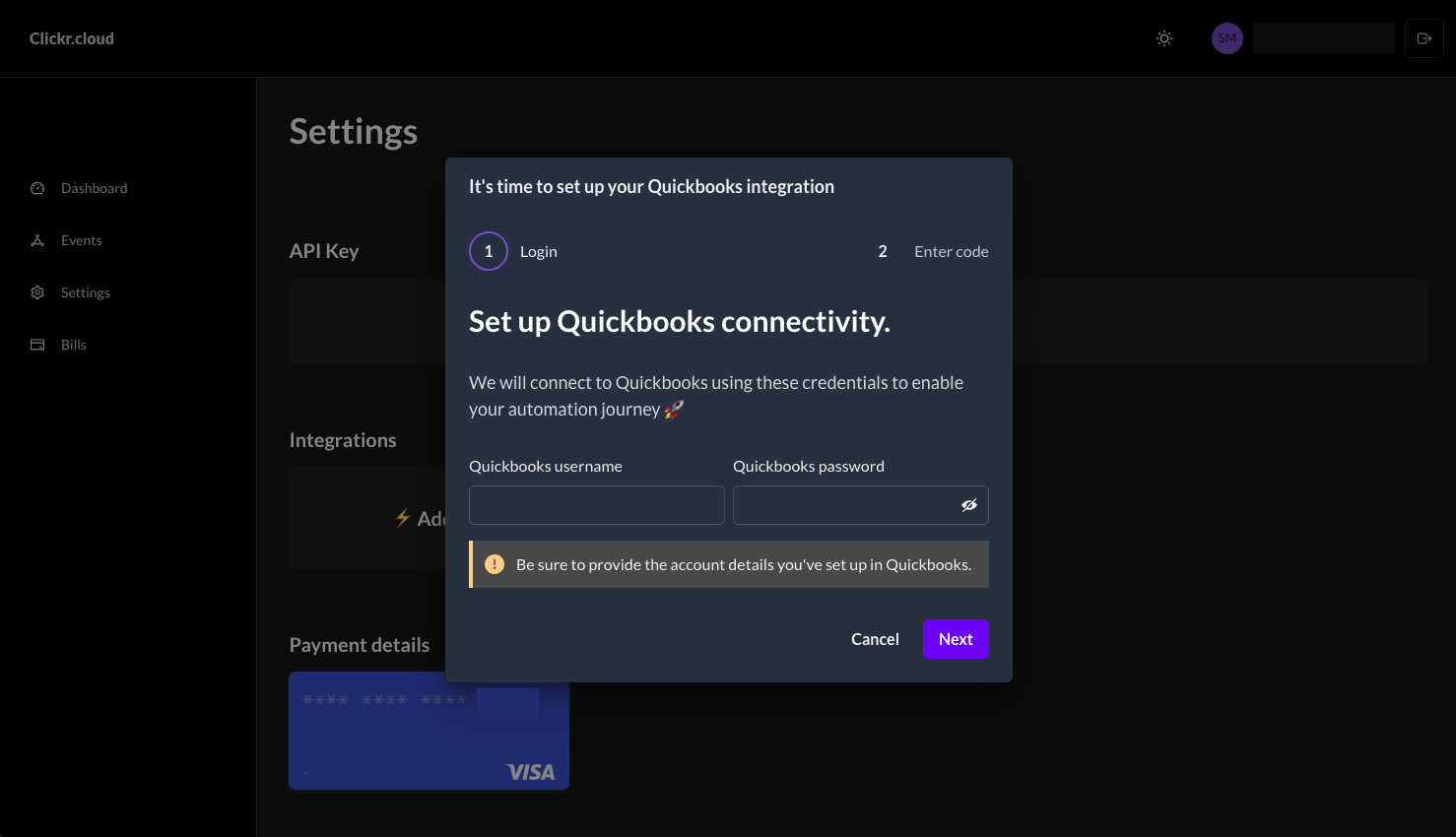
2. Setup Multi-Factor Authentication
Clickr will provide you with a unique phone number that you'll use to link your QuickBooks account.
QuickBooks → User Profile → Manage Your Intuit Account → Sign-in & Security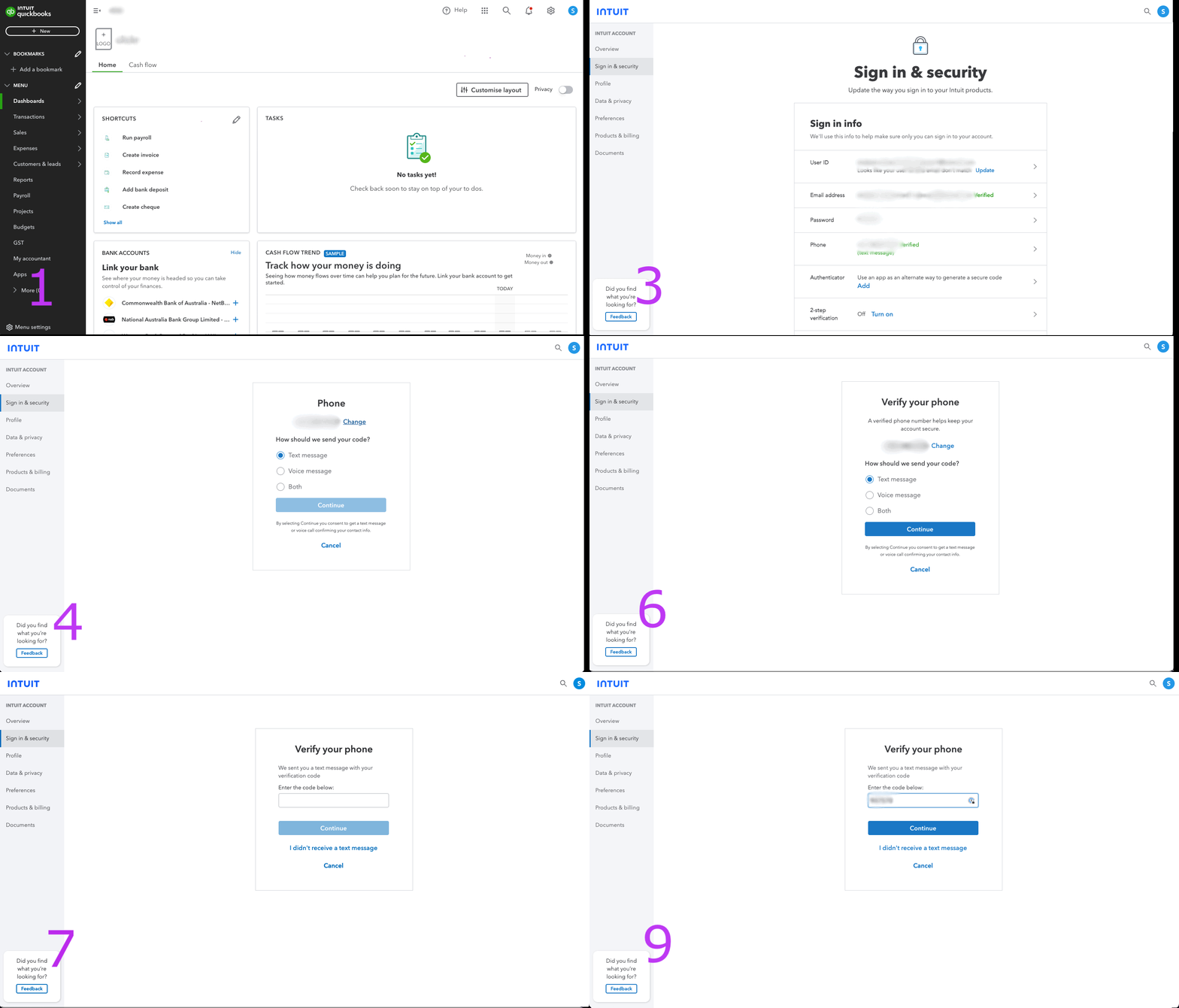
Convert your first estimate to an invoice
Now that your integration is complete, you can start converting estimates. Use this cURL command to convert an estimate to an invoice. Be sure to use an estimate ID that exists in your QuickBooks account.
curl -X POST "https://api.clickr.cloud/v2/integrations/quickbooks/estimates/convert-to-invoice" \
  -H "Authorization: Bearer YOUR_TOKEN_HERE" \
  -H "Content-Type: application/json" \
  -d '{
    "txnId": "EST-1042",
    "statusCallbackUrl": "https://your-app.com/webhooks/invoice-created",
    "metaData": { "jobId": "job_8f3a2b" }
  }'
Invoice a percentage or fixed amount
If QuickBooks progress invoicing is enabled, pass percentage to bill a proportion of the estimate, or amount for a fixed currency value. These two fields are mutually exclusive - do not provide both in the same request.
curl -X POST "https://api.clickr.cloud/v2/integrations/quickbooks/estimates/convert-to-invoice" \
  -H "Authorization: Bearer YOUR_TOKEN_HERE" \
  -H "Content-Type: application/json" \
  -d '{
    "txnId": "42",
    "percentage": "50",
    "invoiceDate": "05/20/2026",
    "dueDate": "06/19/2026",
    "noteToCustomer": "50% deposit - thank you!"
  }'
To bill a fixed amount instead, replace percentage with amount:
curl -X POST "https://api.clickr.cloud/v2/integrations/quickbooks/estimates/convert-to-invoice" \
  -H "Authorization: Bearer YOUR_TOKEN_HERE" \
  -H "Content-Type: application/json" \
  -d '{
    "txnId": "42",
    "amount": "1200.00",
    "invoiceDate": "05/20/2026",
    "invoiceNumber": "INV-2026-001"
  }'
Invoice per line item
For per-line control, provide a lineItems array with a due field on each entry. Each line can specify its own percentage or fixed amount independently. This cannot be combined with percentage or amount.
curl -X POST "https://api.clickr.cloud/v2/integrations/quickbooks/estimates/convert-to-invoice" \
  -H "Authorization: Bearer YOUR_TOKEN_HERE" \
  -H "Content-Type: application/json" \
  -d '{
    "txnId": "42",
    "lineItems": [
      {
        "description": "Initial deposit",
        "due": { "value": "50", "unit": "percent" }
      },
      {
        "due": { "value": "1200.00", "unit": "amount" }
      }
    ]
  }'
Ready to automate QuickBooks invoicing?
Convert estimates to invoices and create invoices programmatically.