
QuickBooks Projects
The API
QuickBooks
didn't build.
QuickBooks doesn't expose Projects in their developer API. Clickr fills the gap. Full programmatic access to create, update, and retrieve projects, including fields unavailable through the official API.
Want to react to project changes? Set up QuickBooks Webhooks →
POST /v2/integrations/quickbooks/projects
Live
// Request
-H "Authorization: Bearer ***"
{
"projectName": "Johnson Residence Phase 2",
"customerName": "Johnson Family LLC"
}
// Response · 312ms
200 OK
{
"projectId": "qb_proj_a8f2c1",
"status": "created",
"projectName": "Johnson Residence Phase 2"
}
How it works
Not magic.
Browser automation.
01
Your code calls our API
POST to our endpoint with a project name and customer. From curl, Zapier, n8n, your app, or a Claude agent - anywhere that speaks HTTP.
POST /v2/integrations/quickbooks/projects
02
We handle QuickBooks
Clickr logs into QuickBooks as you, navigates to Projects, and creates or updates the record. MFA? We handle that natively.
312ms average response time
03
You get the result
A clean JSON response comes back confirming the action. Your workflow continues. No browser, no screen, no manual step.
{ "status": "created", "projectId": "..." }
Endpoints
What you can do
with this API.
POST
Create a project
/v2/integrations/quickbooks/projects
Create a new project in QuickBooks and associate it with an existing customer.
projectName
customerName
address
notes
status
PUT
Update a project
/v2/integrations/quickbooks/projects/:id
Modify an existing project's details, status, or any field available in the QuickBooks Projects UI.
projectName
status
address
notes
custom fields
GET
Retrieve projects
/v2/integrations/quickbooks/projects
List all projects or query by customer, status, or date range.
projectId
projectName
customerName
status
createdAt
✦
Claude Code & AI agents
Give your Claude
agent access
to QuickBooks.
Every Clickr endpoint is a standard REST call - trivial to wrap as a Claude tool, an MCP server, or an n8n AI node. Your agent can create projects on demand, check statuses, and update records without touching a browser.
Agent creates a project when a new job is won in your CRM
Claude pulls project status to answer questions from your team
Automate project creation from incoming emails or Slack messages
Chain with QuickBooks Webhooks for full bidirectional automation
✦
Claude agent · quickbooks tool enabled
User
New job won. Create a QuickBooks project for Riverside Corp - Phase 1 renovation.
Tool call
create_quickbooks_project({ "projectName": "Riverside Corp Phase 1", "customerName": "Riverside Corp" })
Result
{ "projectId": "qb_proj_b3c7d2", "status": "created" }
Claude
Done. QuickBooks project 'Riverside Corp Phase 1' has been created and is ready to use.
Connect to 1000s of apps
Works with Make, n8n, Zapier, Claude Code, or any tool that can make an HTTP request.





Custom
Custom
Custom
Custom
How does Clickr create projects through API?
Behind the scenes, Clickr is a browser automation tool that mimics the manual process of creating and updating projects, breaking each step down into precise actions. When triggered via API, Clickr re-executes these steps, ensuring consistent and accurate project management.
To make automation even more accessible, Clickr has been wrapped into popular tools like Zapier and n8n, allowing no-code users to trigger and manage QuickBooks Projects effortlessly. For developers and advanced users, the underlying API remains fully accessible through custom applications, Postman, Claude Code, or direct API calls.
1. Create Your Clickr Integration
To get started, go to your Clickr Dashboard and click the add integration button.
Clickr Dashboard → ⚡ Add Integration → Enter QuickBooks Credentials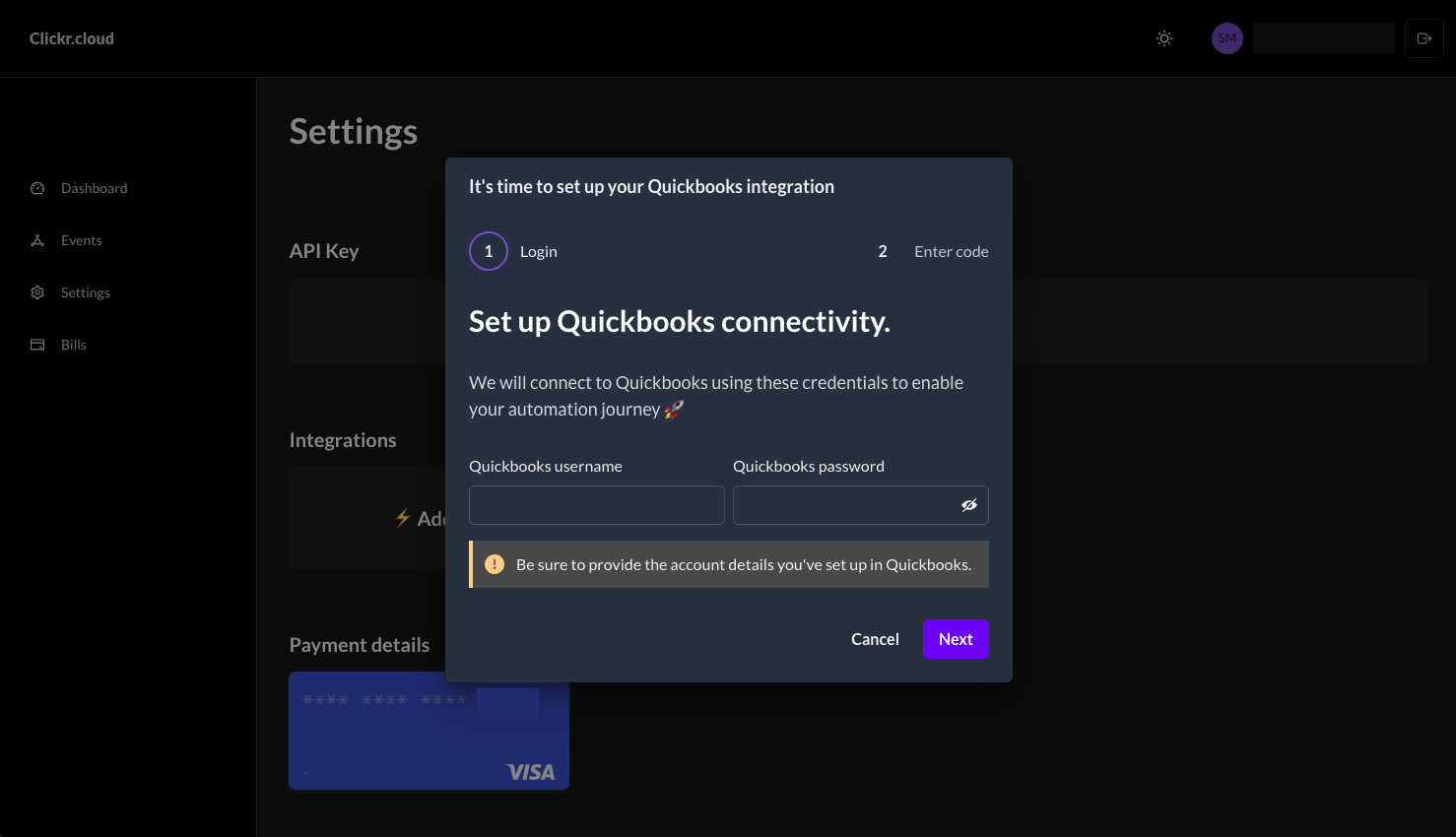
2. Setup Multi-Factor Authentication
Clickr will provide you with a unique phone number that you'll use to link your QuickBooks account.
QuickBooks → User Profile → Manage Your Intuit Account → Sign-in & Security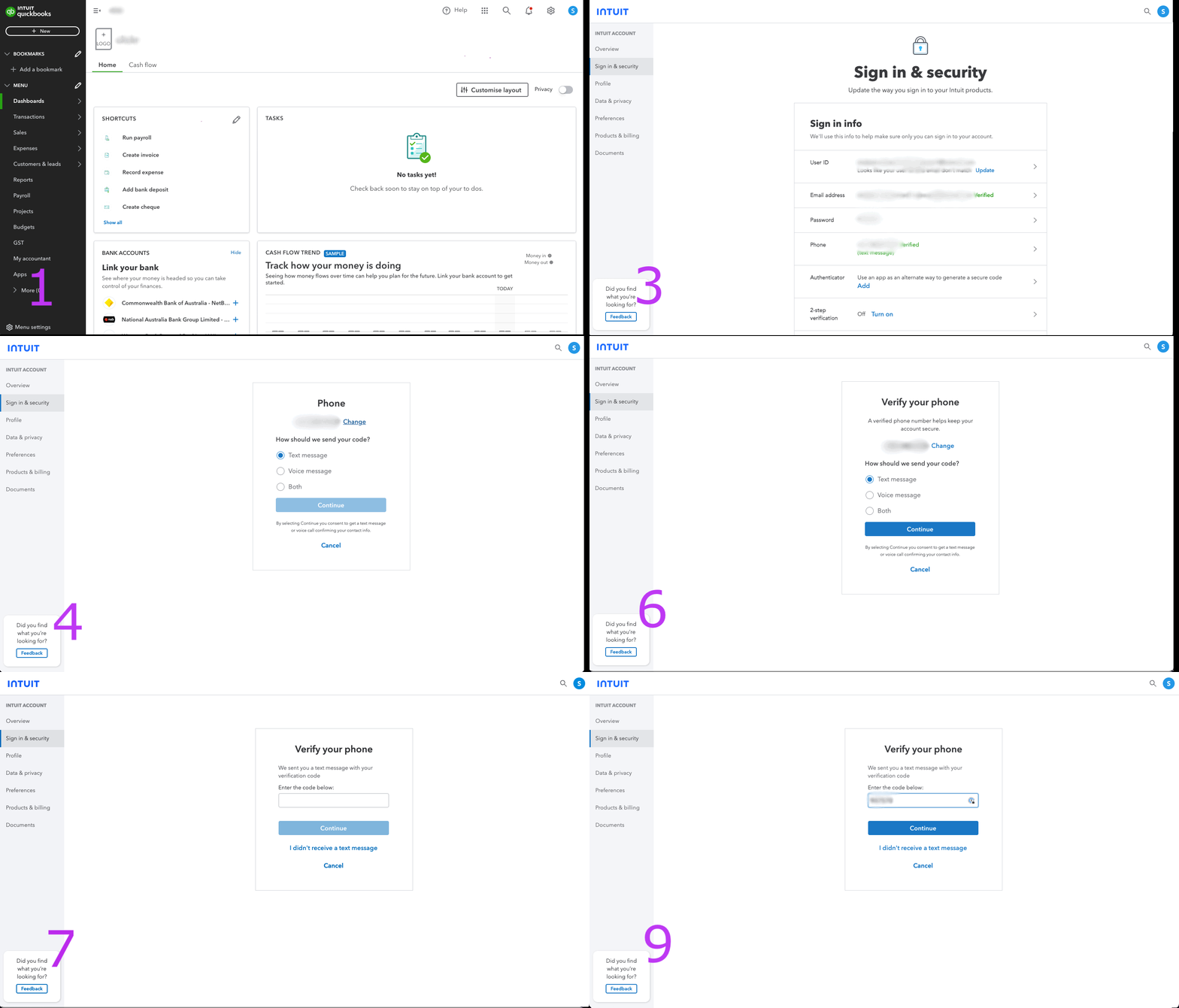
Create your first Project
Now that your integration is complete, you can start creating projects. Use this cURL command to create your first project. Be sure to use a customer name that already exists in your QuickBooks account.
curl -X POST "https://api.clickr.cloud/v2/integrations/quickbooks/projects" \
  -H "Authorization: Bearer YOUR_TOKEN_HERE" \
  -H "Content-Type: application/json" \
  -d '{
    "projectName": "Johnson Residence Phase 2",
    "customerName": "Johnson Family LLC"
  }'
Ready to automate QuickBooks Projects?
Create, update, and manage QuickBooks Projects programmatically.