
QuickBooks Webhooks
React to every
QuickBooks change.
Instantly.
QuickBooks doesn't push changes - you'd have to poll yourself. We watch your account and POST to your URL the moment a project is created, updated, or deleted.
Need to create or update projects too? See QuickBooks Projects API →
POST → your-webhook-url.com
Event received
// Incoming event
{
"event": "project.updated",
"projectId": "qb_proj_a8f2c1",
"projectName": "Kitchen Remodel",
"status": "Completed"
}
// Your server responded
200 OK · acknowledged in 48ms
How it works
You add a URL.
We do the rest.
01
Add your webhook URL
Paste any URL into the dashboard - Make, n8n, Zapier's webhook trigger, or your own endpoint. That's the whole setup.
dashboard.clickr.cloud/webhooks
02
We watch QuickBooks for changes
We poll your QuickBooks account continuously and detect project creates, updates, and deletes as they happen. You run no infrastructure.
Monitors 24/7 · Detects in minutes
03
Your URL gets the payload
The moment a change is detected, we POST the full project record to your endpoint. Your workflow fires. No polling loop on your end.
POST application/json · full project record
Events
Every event,
full payload.
project.created
New project created
Fires whenever a new project is added to QuickBooks. Use this to create matching records in your CRM, project management tool, or billing system.
projectId
projectName
customerName
status
customFields
createdAt
project.updated
Project updated
Fires when any field on a project changes - name, status, dates, notes, or custom fields. Includes the full updated record.
projectId
projectName
status
createdAt
customFields
project.deleted
Project deleted
Fires when a project is removed from QuickBooks. Keep downstream systems in sync automatically.
projectId
projectName
isDeleted
✦
Claude Code & AI agents
Let your agent
react to what
QuickBooks does.
Webhooks are just HTTP - trivial to route into a Claude tool, an n8n AI node, or any automation that accepts incoming requests. Your agent responds to real events, not a polling schedule.
Agent closes a CRM deal when a project is marked Completed
Trigger invoice generation the moment a project is created
Chain with the Projects API for full bidirectional automation
Log every QuickBooks change to Slack, Notion, or your own database
✦
Claude agent · webhook tool enabled
User
When a QuickBooks project is marked Completed, close the matching deal in our CRM.
Tool call
subscribe_quickbooks_webhook({ "events": ["project.updated"], "filterField": "status", "filterValue": "Completed", "webhookUrl": "https://api.myapp.com/hooks/qb" })
Result
{ "webhookId": "wh_f4b2a9", "status": "active" }
Claude
Done. The webhook is live. When any QuickBooks project status changes to 'Completed', your CRM deal will be closed automatically.
Connect to 1000s of apps
Works with Make, n8n, Zapier, Claude Code, or any endpoint that accepts a POST request.





Custom
Custom
Custom
Custom
How does the Clickr QuickBooks Webhook work?
Behind the scenes, Clickr is a browser automation tool that mimics the manual process of finding changes in QuickBooks Projects, breaking each process down into precise steps. Periodically, Clickr re-executes these steps and notifies you of changes, ensuring consistent and accurate project management.
To make automation even more accessible, Clickr has been wrapped into popular tools like Zapier and n8n, allowing no-code users to trigger workflows effortlessly. For developers and advanced users, the underlying system fully supports custom webhooks into other systems or your own applications.
1. Create Your Clickr Integration
To get started, go to your Clickr Dashboard and click the add integration button.
Clickr Dashboard → ⚡ Add Integration → Enter QuickBooks Credentials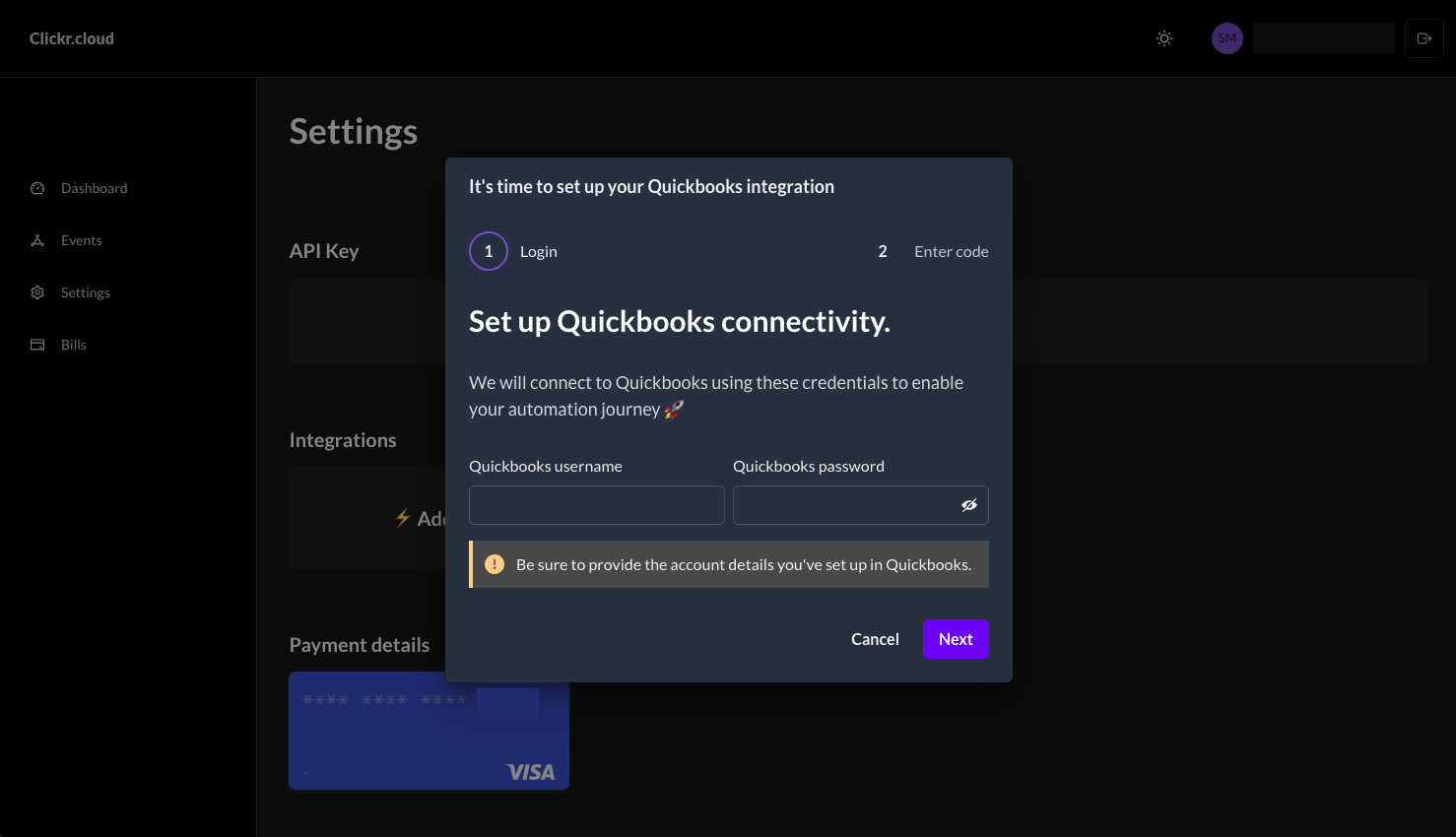
2. Setup Multi-Factor Authentication
Clickr will provide you with a unique phone number that you'll use to link your QuickBooks account.
QuickBooks → User Profile → Manage Your Intuit Account → Sign-in & Security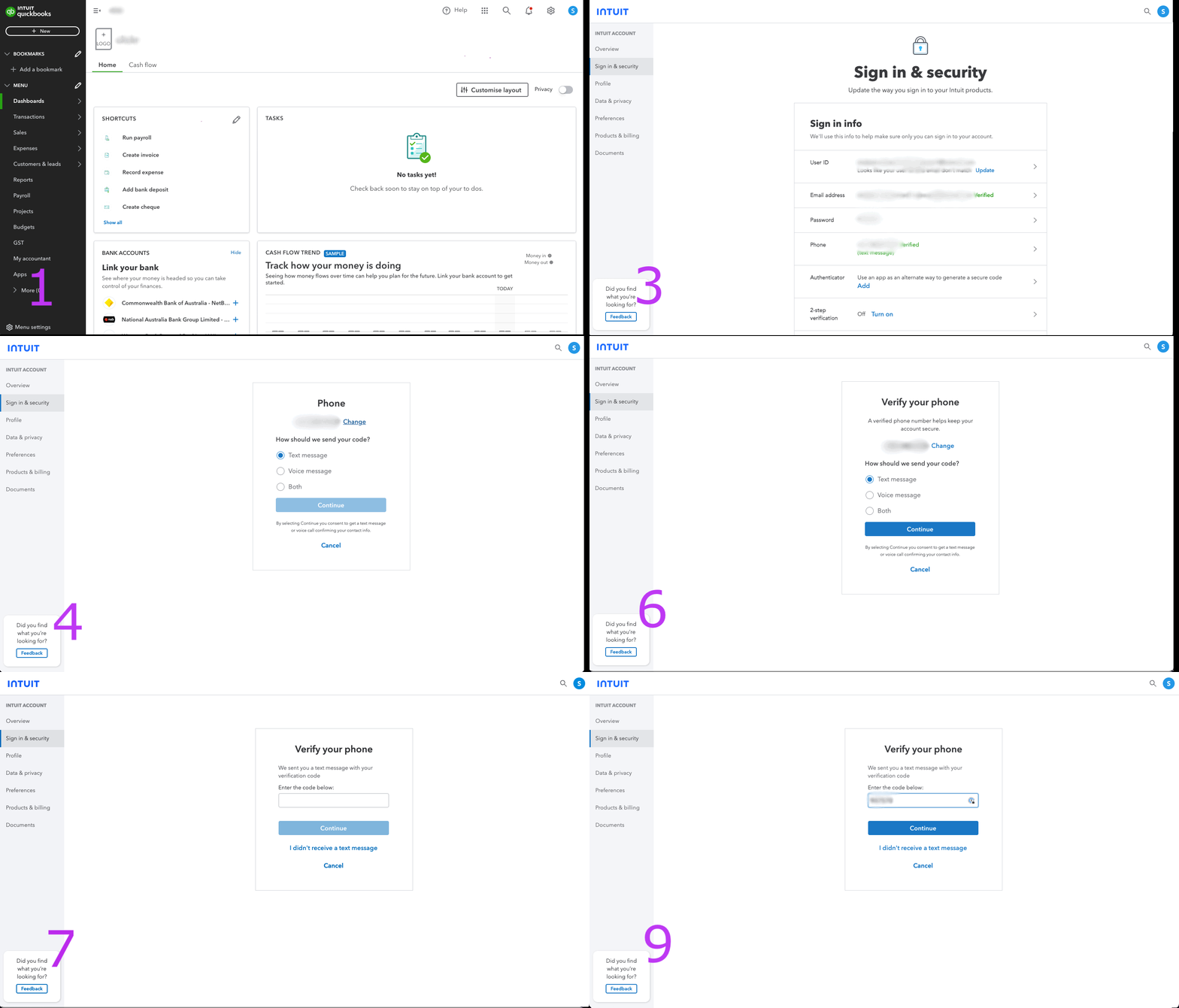
Add your webhook URL
Add a webhook in the dashboard and paste your URL — from Make.com, n8n, or Zapier's Webhooks by Zapier, or your own endpoint.
We POST on every change
When we detect a project create, update, or delete, we POST the full project payload to your URL. No polling on your end.
Example webhook payload
We send a JSON body with the full project record. Example:
{
  "event": "project.updated",
  "projectId": "qb_proj_a8f2c1",
  "projectName": "Kitchen Remodel",
  "status": "Completed",
  "startDate": "2024-01-15",
  "endDate": "2024-03-20",
  "notes": "Client approved final walk-through",
  "customFields": [],
  "isDeleted": false,
  "timestamp": "2024-03-20T14:32:08Z"
}
Ready to react to QuickBooks project changes?
Add a webhook URL and your first notification fires in minutes.